Features
Everything below is in the product today.
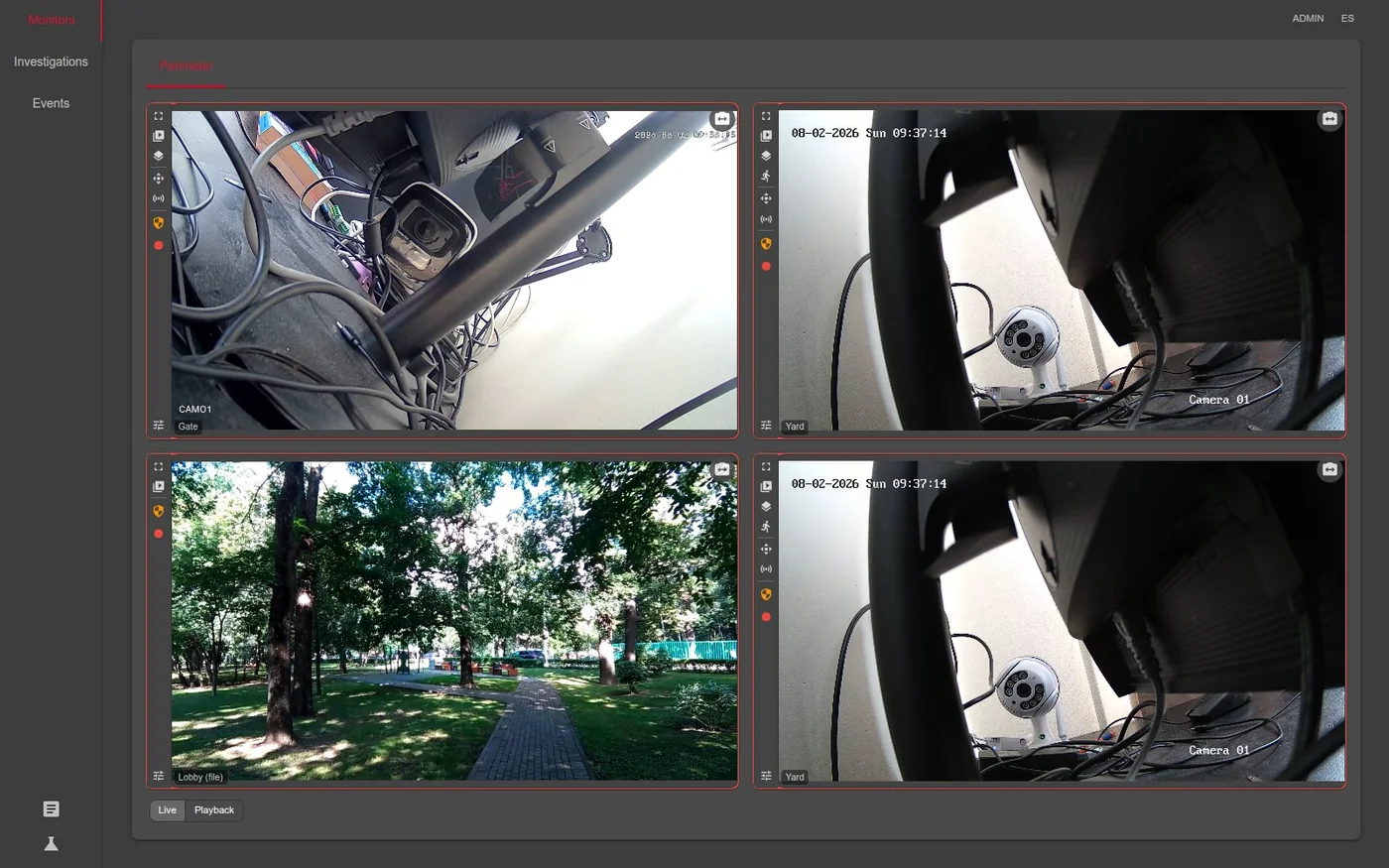
Video walls
Monitors are defined once by an administrator and opened by operators. Layouts available:
1x1, 1x2, 2x2, 1+5, 1+7, 3x3, 4x3, 4x4.
Each cell is independent — switch it between live and archive, cycle through the camera’s streams
(main, sub, …), expand it to full screen, or pull up the PTZ pad and relay controls without
leaving the wall.
Each cell also picks the stream that fits it. A small tile on a 4x4 wall opens the sub-stream instead of a full-resolution main stream, and swaps over seamlessly when the tile is resized — the choice is made from the frame parameters the recorder actually observes, not from a configured label. That is what keeps a sixteen-camera wall fluid.
Operators also get investigation boards: their own ad-hoc walls, always in playback, holding any cameras they have access to. A finished board can be handed to another user as a copy.
Synchronised playback
The whole wall shares one playhead. Play, pause, step ±30 seconds, jump to an exact date and time, or skip to the previous or next day that actually has recordings — every cell follows together.
Frame alignment across cameras is not approximated: the archive is served as HLS with
EXT-X-PROGRAM-DATE-TIME wall-clock anchors, so cells stay on the same real-world instant.
The timeline underneath shows coverage bars for what is actually recorded and brackets marking events, and it zooms and pans down to the second.
Recording
Profiles — three modes:
| Mode | Behaviour |
|---|---|
| Continuous | records the whole time the camera is armed |
| Pre-alarm | keeps a rolling buffer, commits it when an alarm fires |
| Off | no recording |
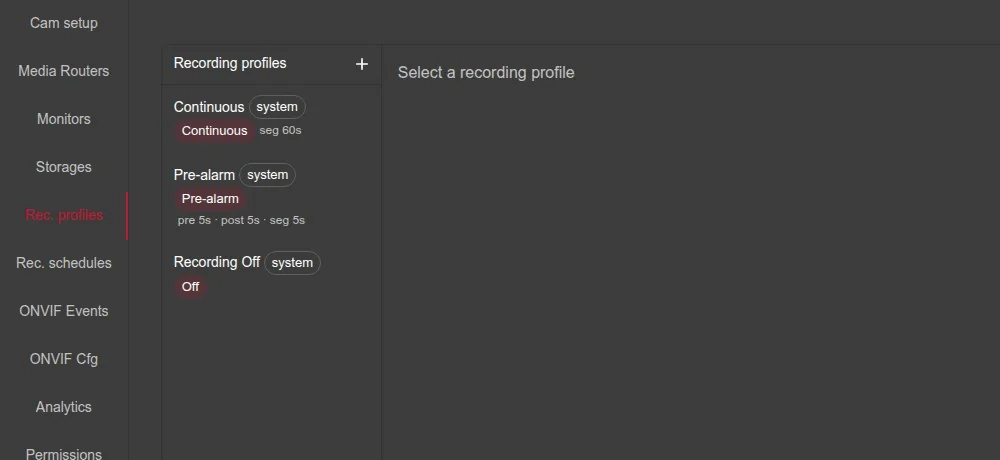
Pre-record, post-record and segment length are configured in seconds. Pre-alarm is what keeps the footage from before the trigger — the rolling buffer is swept continuously and only alarm-linked clips survive.
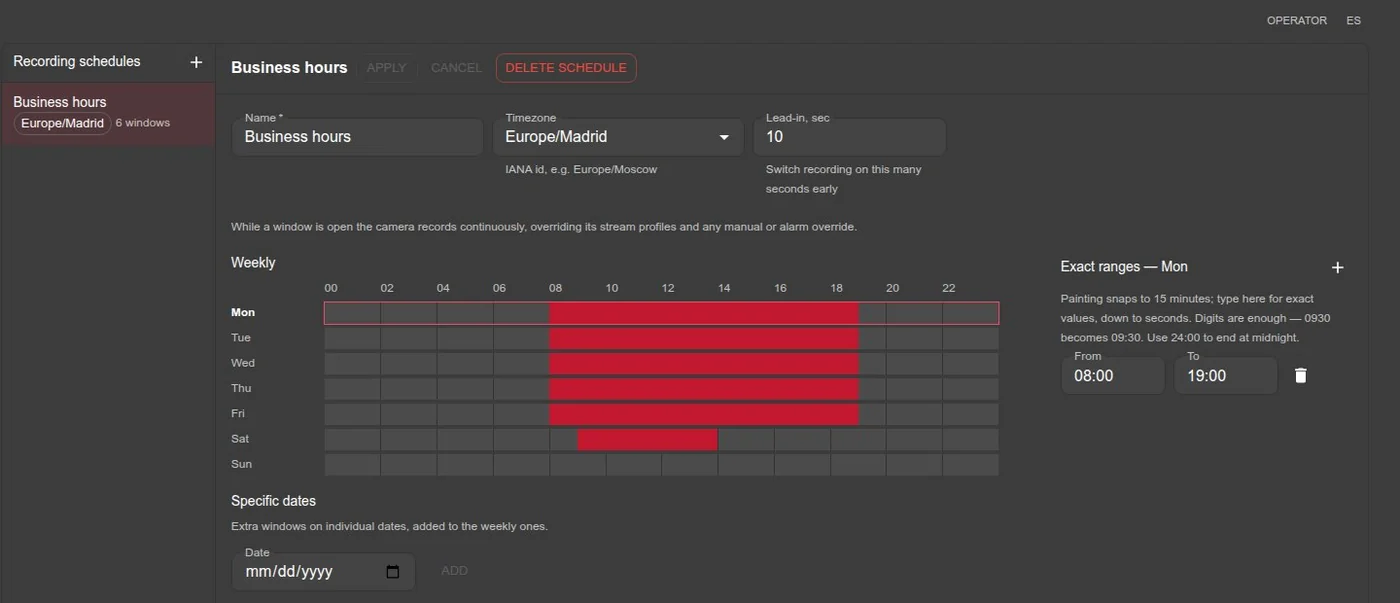
Schedules — named, timezone-aware, painted on a weekly grid in 15-minute steps, refined by typed ranges down to the second, plus one-off specific dates. A lead-in setting starts recording before the window opens.
Storage — define any number of volumes and assign several to one camera in priority order. If the primary volume’s path is unreachable, the recorder falls through to the next one automatically. A volume can also be taken out of service by hand, and the recorder skips it.
Recording that cannot happen no longer looks like recording that is happening. Before recording is switched on, the file service is asked whether it can: no storage assigned, an unreachable path, or a volume that refuses a probe file is reported at the click with the reason named, instead of being discovered later through missing files. In the camera list a red frame means recording right now; footage merely being retained is marked apart from it.
Video analytics
Detection runs on OpenVINO, on CPU or GPU. Two models ship in the box: a YOLO26 detector for people and vehicles, and a dedicated face detector. Nothing to download, nothing to mount.
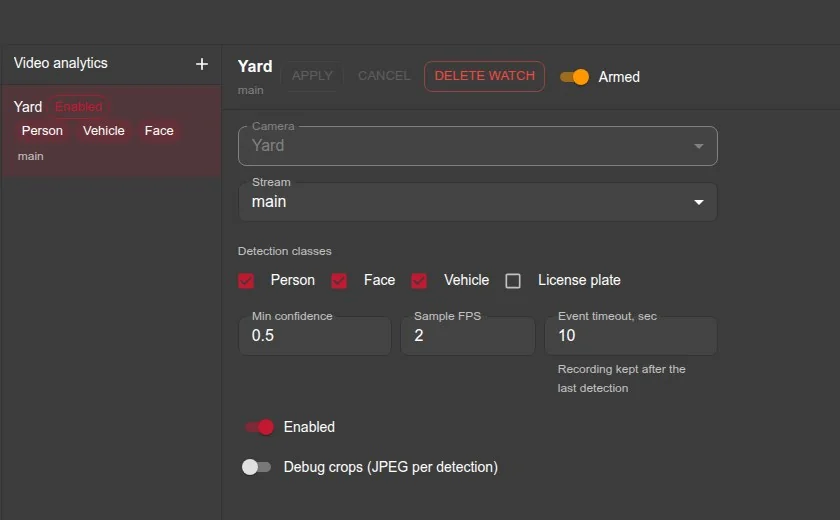
Analytics is switched on per camera stream, not per camera — point it at the sub-stream and the main stream stays untouched for recording. Each watch sets:
| Setting | What it does |
|---|---|
| Classes | person, face, vehicle — any combination |
| Minimum confidence | detections below the threshold are dropped |
| Sampling rate | frames per second actually inspected; 1–2 is plenty for most scenes |
| Event timeout | how long without a detection before the event is closed |
| Debug crops | keep the cropped images for review, or save the disk space |
Arming is about recording, not about looking: a camera that simply records around the clock is still marked up with detections and events, so its archive carries overlays and its clips can be re-compressed. What analytics costs is set by the watch — its sampling rate, or switching it off.
The recorder publishes a dedicated stream to the detection worker instead of letting it read the same path an operator is watching. Turning analytics on therefore no longer competes with live viewing.
Re-identification across cameras. Every detected body gets an appearance embedding, and sightings are matched against a rolling gallery. A person walking from one camera to the next stays one object and groups into one event instead of producing a separate event per camera — and the same holds across gaps, when someone leaves the frame and comes back.
What the operator sees:
- events grouped by source (analytics or ONVIF), with duration and the clips that cover them;
- a gallery of cropped thumbnails per event, click to enlarge;
- bounding boxes drawn over live video — one server-sent-events connection for the whole wall, filtered by the viewer’s camera permissions;
- one click from an event into synchronised playback parked on that moment.
Detections, crops and events are cleaned up on a retention window and a size cap, so analytics does not quietly eat the volume.
Search by appearance
Every detection can keep an appearance embedding, which turns the archive into something you can query by object rather than by time. Start from a box clicked on live video, from a detection in an event, from a track in the archive, or from an uploaded JPEG, and the system ranks matching appearances across cameras.
| Object types | person, face, vehicle, licence plate |
| Where to search | any subset of the cameras the user may see |
| When | an arbitrary time range |
| How strict | a similarity threshold — faces across cameras usually need a lower one than bodies |
Results are grouped into appearances rather than listed as raw hits: one track on one camera is one row, with its best crop, first and last sighting, and a click straight into synchronised playback parked on that moment. If the detection sits in a recording gap — analytics running without recording — the nearest footage is offered instead of an error.
It is a lead, not an identification. The system ranks who looks similar; the operator decides.
PTZ auto-tracking
A PTZ camera can be handed a moving object and keep it in frame by itself.
An operator clicks a box on live video and the camera takes it from there. Or nobody clicks: give the camera an ordered list of what to prefer — person, face, vehicle — and it picks a target on its own, around the clock, whether or not anyone is watching. Boxes can come from the built-in detector, from the camera’s own ONVIF metadata, or both.
The control law keeps the object in frame rather than centred: a subject standing still and fully visible is already framed correctly, and every command sent to improve on that is a twitch of the picture bought for nothing. Motion runs in short bursts, one per sighting, so a producer that goes quiet leaves the camera stationary instead of drifting. A target lost behind an obstacle is reacquired by appearance first and proximity second, so the camera keeps the same object rather than grabbing whatever moves next.
Calibration. Which way the picture moves when the motor turns depends on how the camera is mounted, so each one is calibrated once: automatically — the system nudges the axes and measures the resulting background motion — or through a wizard where an operator drives the moves and says which way the picture went. A camera hanging sideways or inverted then tracks correctly.
Which cameras may be driven is an explicit per-camera flag rather than the ONVIF capability: firmware advertises a PTZ service whether or not a motor was ever fitted.
Maps and plans
Cameras are placed where they really stand — on a street map, or on a plan of your own — and the map becomes a working screen rather than a picture of the site.
- Maps and nested plans. A site map over map tiles, buildings inside it, floors inside the buildings. A plan is drawn on any picture — a floor plan, a drawing, a photo from above — in real coordinates or in made-up ones, and its outline on the parent is the way in.
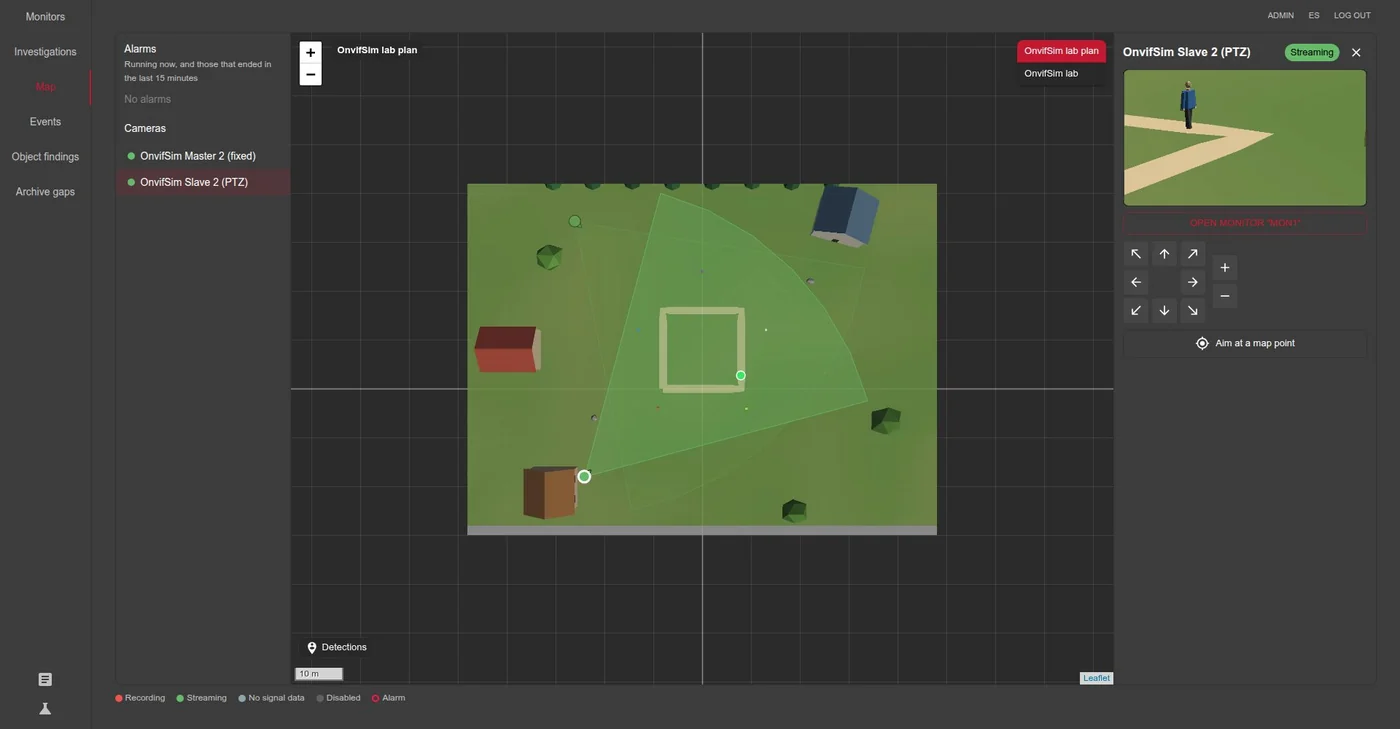
- The operator’s map. Every camera with its field of view and its status, live video in a side panel, and the recent alarms listed beside the map, each a click away from its camera.
- Detections on the ground. A fixed camera puts its live detections on the map: the dot is where the feet are, in the same colour as the box on the video.
- Click, and the PTZ turns. A calibrated PTZ aims at any point clicked on the map and reports how far away it is.
- Master and slave through the map. A fixed camera’s detections drive a PTZ through their shared coordinates. Each camera is calibrated once, on its own, so any pair works as soon as both are — no survey of the pair. The slave zooms by distance, so a person keeps their size in frame as they walk away.
Calibration takes landmarks, not surveying. Drop a few landmarks — a corner, a pole, a hatch — on the map. A PTZ is turned onto each one and records where it pointed: two make a calibration and a third checks it. On a fixed camera each landmark’s foot is clicked in the picture: four make the mapping, and from the fifth every miss is shown in metres.
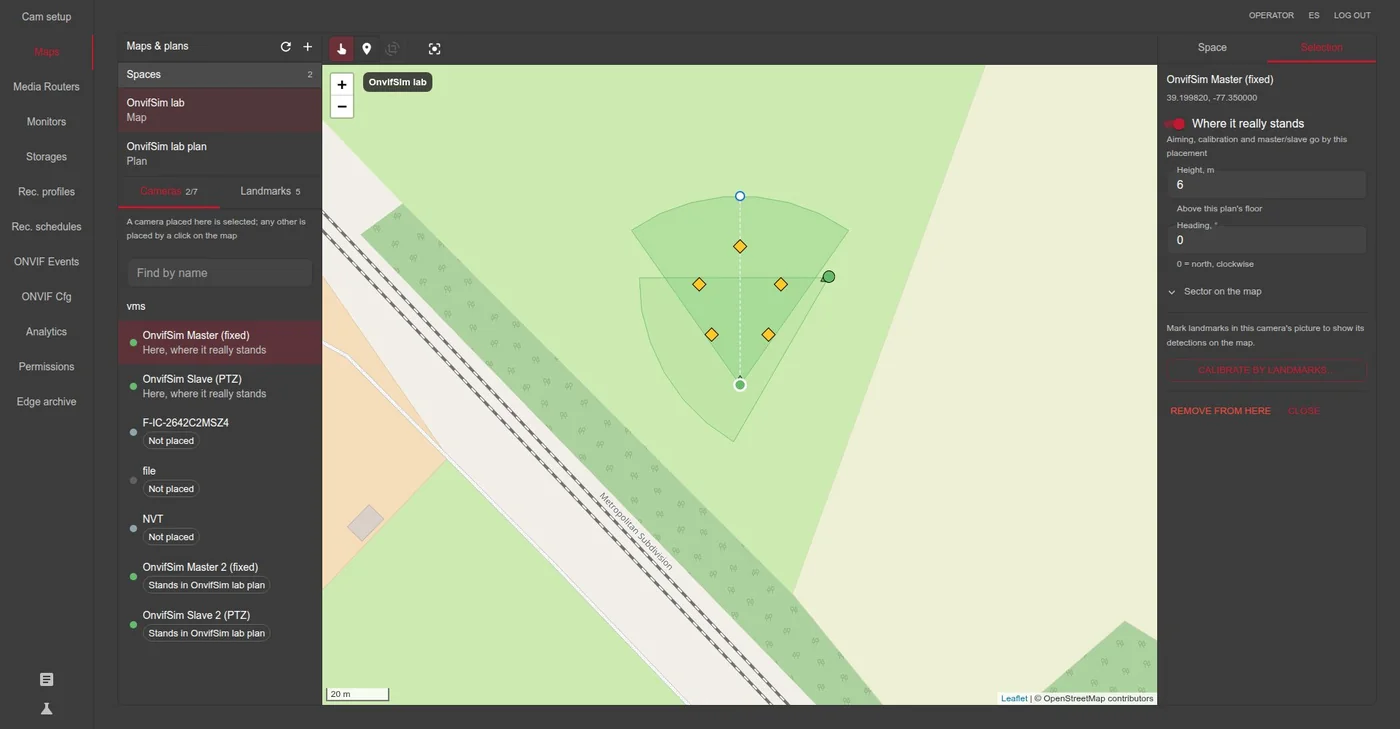
Map tiles come from OpenStreetMap or your own tile server, through the gateway’s cache: browsers never call the provider.
Archive re-compression
Ordinary video compression does not know what matters in the frame — an empty wall and the plate of an arriving car are stored in equal detail. The system already knows where the people and vehicles were, because it found them there, so finished clips are re-encoded later with those regions protected and the rest squeezed harder.
- Nothing happens live. The camera records as it always did; re-compression runs afterwards, on a configurable delay, so fresh footage that is actually being watched is left alone.
- Only clips worth touching. A clip with no detections is skipped — there is nothing to protect and re-encoding for its own sake only loses quality. A coverage band sets the rest: below it the detector saw too little, above it the objects fill so much of the frame that there is no background left to pay with.
- The original wins ties. If the re-encode does not come out smaller, the recording is kept as it was recorded and marked so.
- Hardware where there is any. Intel Quick Sync, VA-API or CPU, chosen automatically; a GPU is not required.
- Visible in the interface. Recordings show whether they were re-compressed or kept as recorded, so an operator always knows what they are looking at.
Measured on a 1280×720 test scene: HEVC 8.38 → 4.82 MB (−42%), H.264 7.05 → 4.50 MB (−36%). On a 2688×1520 clip from a real archive, with people close to the camera, 39.55 → 31.23 MB. The saving grows the smaller the share of the frame that has to stay sharp, and quality inside the protected regions does not drop.
Cameras and ONVIF
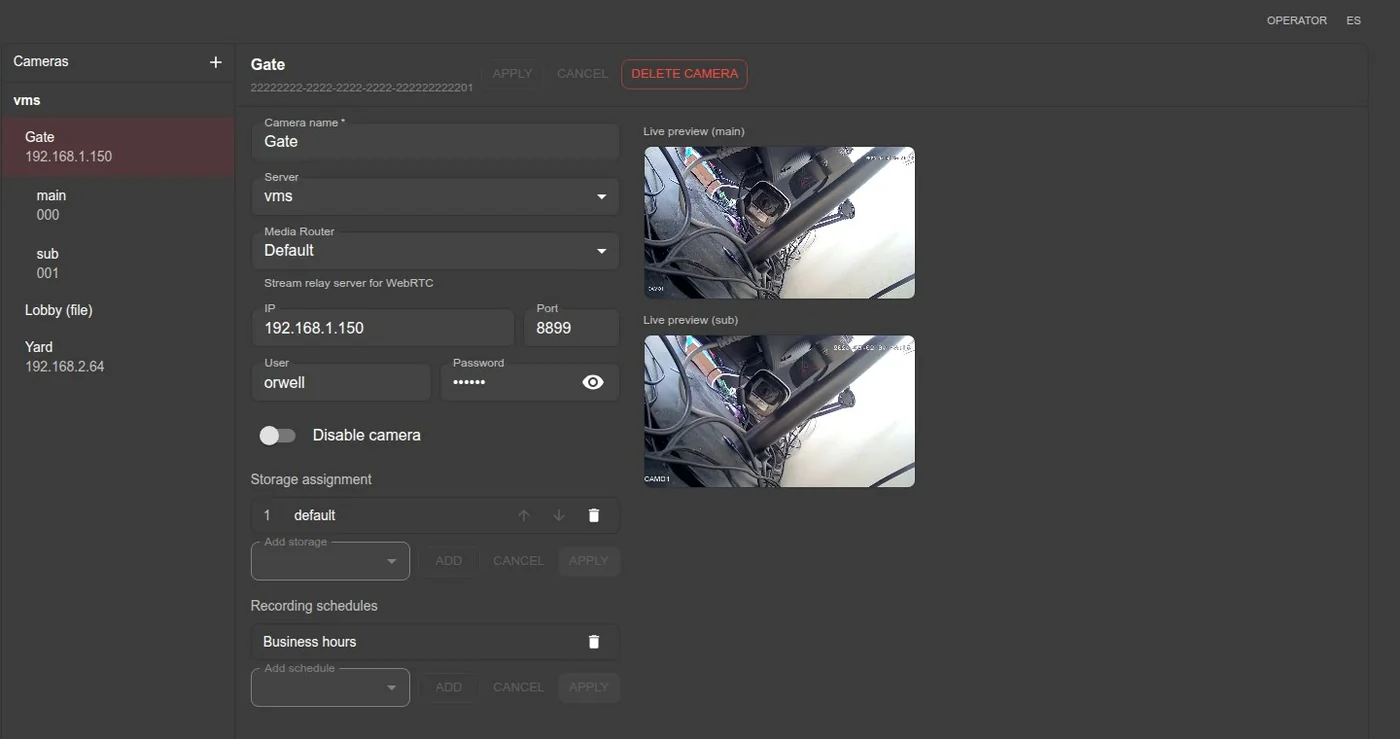
Cameras are added either by discovery — a WS-Discovery scan of the network that lists devices and previews their ONVIF profiles before you commit — or by typing an RTSP URL directly.
A camera can also be a file instead of a device — point a stream at a video file and the rest of the system treats it exactly like a camera. Useful for demos, for replaying an incident, and for testing a deployment before the hardware arrives.
Configuring the device itself
You do not need the camera’s own web interface. Tabs appear according to what each device actually advertises, so you only ever see what that camera supports:
- Video — resolution, frame rate, bitrate, GOP length, H.264 profile, encoding
- Audio — bitrate, sample rate
- Imaging — brightness, contrast, saturation, sharpness
- PTZ — continuous, absolute and relative moves; save, recall and delete presets
- I/O — relay outputs (monostable/bistable, idle state, switch-back delay) and digital inputs
- System — device information, device time, sync the clock to the server, reboot
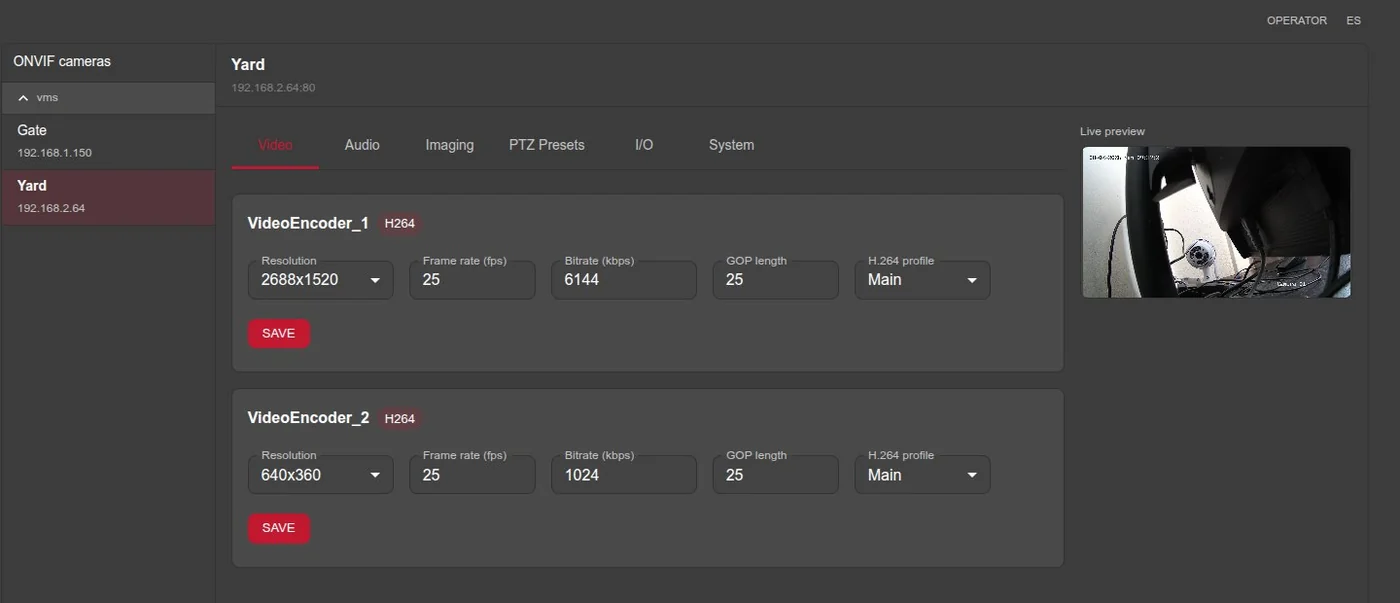
Changes are written straight to the camera over ONVIF. The clock matters more than it looks: archive search and multi-camera playback line up by wall-clock time, so a camera drifting by minutes lands its footage in the wrong place on the timeline.
Events from the camera
Subscribe a camera to its ONVIF events and filter them into alarms by topic and payload text, with a recording duration per filter. Presets cover the usual cases — motion, face detection, line crossing, region intrusion, alarm I/O and object detection — and an event log shows what the camera is actually sending, which is the quickest way to find out what a given model calls things.
Access control
Sign-in through Keycloak is optional. Turn it on and you get roles plus a per-user, per-camera permission matrix over five separate actions:
Live · Archive · PTZ · Control · Export
Permissions are enforced on the server for every request — including individual HLS segments and the live detection stream — not merely hidden in the interface. Downloading a whole clip is a distinct permission from watching the archive.
Architecture
The system is a set of small services communicating over gRPC, with configuration changes propagated by publish/subscribe rather than polling. That makes it scale sideways:
- several MediaMTX media routers, with cameras assigned across them;
- several recorder + filesystem pairs, with archive queries fanned out across all of them;
- analytics workers sharded by hash, added as load grows.
Technical properties
| Camera input | RTSP |
| Live to browser | WebRTC / WHEP, proxied by the gateway — the browser never addresses the media server directly and never sees its credentials |
| Live transcoding | H.265 is passed through to browsers that can decode it; re-encoding to H.264 is a per-router option, running on VA-API with a CPU fallback |
| Archive playback | HLS with fragmented MP4 |
| Archive format | fragmented MP4; H.264 and H.265 written as received, without re-encoding |
| Audio | Opus passthrough, transcoded when the source differs |
| Stills | JPEG frame extraction from the archive at any timestamp |
| Media server security | no anonymous access; separate publish and read accounts, held on the media router itself |
| Archive re-compression | Intel Quick Sync (VPL, mfxExtEncoderROI), VA-API or CPU (x265 / x264), chosen automatically |
| PTZ auto-tracking | one control loop per camera; targets from the detector or ONVIF metadata; mount calibration, automatic or guided |
| Maps | OpenStreetMap or any {z}/{x}/{y} tile server, cached by the gateway; plans from any picture, in real or made-up coordinates; PTZ and fixed cameras calibrated by landmarks |
| Similarity search | Re-ID embeddings over person, face, vehicle and licence plate, searchable by camera set and time range |
Browser note: H.264 plays everywhere. H.265 needs Firefox with libavcodec-extra, or Chrome on
a system with current VA-API, or hardware decoding on macOS and Windows 11 — for the archive, and
for live video where the router passes H.265 through. Turning that router’s H.264 re-encode on
covers the clients that cannot.
📩 Questions? Contact us